Built for the inspection side
of the job.
Linked certificates waiting on you in one queue, Vector Energisation and High Risk Database summaries pulled straight from the ROI, and a dedicated Solar Inspection Testing sheet. Built alongside the electricians you already work with.
Also doing the electrical work yourself? See CertMate's full Electrical plan →
The parts of the job that take the longest. Done for you.
Writing descriptions, transferring test results, checking a regulation and digging through team numbers are the most repetitive tasks around compliance paperwork. CertMate AI handles all four so you can get back on the tools.
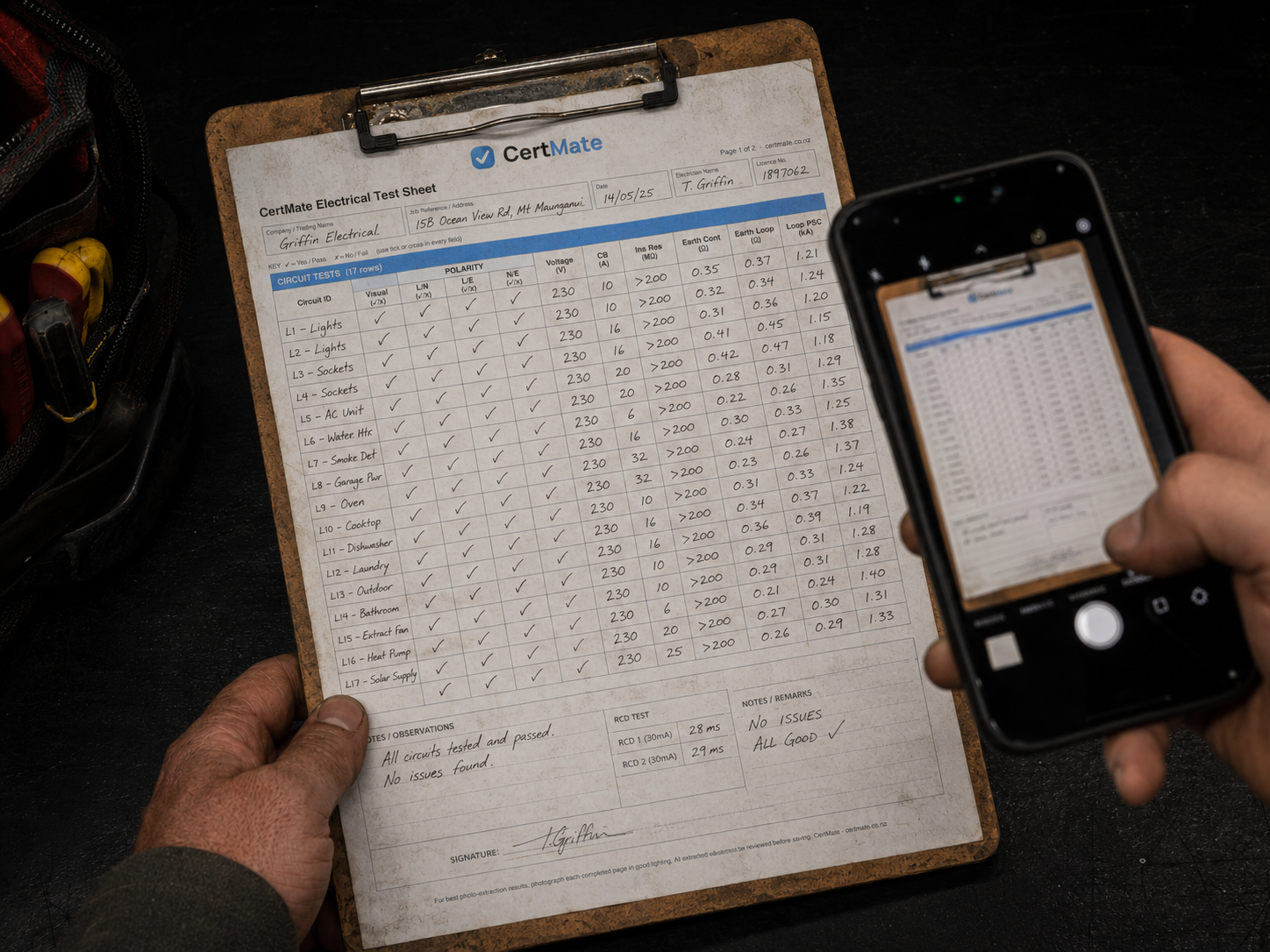
Photo to test sheet
Snap a photo of your handwritten test results and the AI transfers them into your digital test sheet, for both standard electrical test sheets and Emergency Lighting. No re-keying.

Voice to description
Speak your job description and the AI writes it up cleanly. No more stopping to type it all out while you are on site.

NZ Regs Helper
Ask a regulation question in plain English, right from the app, and get pointed to the relevant AS/NZS 3000 clause to check. No flipping blindly through the standard on site. Link your own free copy of the standard too, and open it instantly with Wiring Rules Quick Access.

Company Insight Reports
AI reads your team's output and writes up a plain-English summary: who's completing what, where the trends are, and what's falling behind.
"CertMate's AI speeds up the boring parts. It never makes the safety call."
Transparent about what AI can and cannot do
We believe you should know exactly how AI works in this product: what data it touches, what it can get wrong, and where your responsibility as an electrician begins and ends.
One queue for every job waiting on you
Once an electrician links your company to their certificate, it lands directly in your dashboard, a live queue of every job that's completed on their end and ready for you to inspect. No chasing phone numbers, no emailed PDFs to hunt through, no separate paperwork.
Complete the ROI and it's automatically stitched back to the electrician's original certificate, they see it appear in their own portal the moment you finish. Turn on automatic emails and CertMate sends a copy straight to whoever created the document, and to your office email if your admin team is doing the data entry.


High risk data entry, pulled straight from the ROI
The High Risk categories you record on the ROI are compiled automatically into a dedicated summary sheet, no retyping what you've already entered into a separate form. Everything needed for the High Risk Database is laid out and ready the moment the inspection's done.
Your CMS entry, laid out and ready before you open Vector
Enter Vector Energisation details directly within the ROI, job number, meter number, main fuse size, mains location, tariff, connection point, supply type. CertMate turns it into a clean, copy/paste-ready summary sheet, so every field you need for Vector's own CMS portal is sitting in one place instead of scattered through the certificate.
A one-click "Open the Vector CMS Portal" link sits right next to the summary, so you can jump straight to id.vector.co.nz and enter it in without hunting for the login page.


A dedicated solar test sheet, built into the ROI
Toggle between a standard ROI test sheet and Solar Inspection Testing depending on the job in front of you, strings, inverters, and the readings a solar install actually needs, without forcing a solar job through a generic test sheet it was never built for.
COV, built in, not bolted on
Generate a full Certificate of Verification under AS/NZS 3019:2007, right alongside your ROIs, with no separate tool or template to manage. If the job also needs the connection/reconnection page, tick the box and it's included, leave it off and the certificate stays a clean single page.


Old paperwork, stored and searchable, free
Upload old certificates and records at no extra cost, tag them with a customer name, site address and certificate type, and find them again in seconds. View or download any of them, any time, instead of digging through folders for a record from years ago.
Wiring Rules Quick Access

Every registered electrician is required to work to AS/NZS 3000, but having it on hand on the job is another matter. Most electricians don't carry a copy, and default to phoning a colleague for an answer instead of checking the standard themselves.
CertMate lets you link your own locally saved free personal copy, downloaded from your EW Portal, and open it instantly from anywhere in the app, on any job. Once linked, it stays linked, no re-downloading, no digging through your files every time.
What this is, and isn't
AS/NZS 3000 remains the copyright of Standards New Zealand and Standards Australia. CertMate doesn't sell, host, or provide the standard, and never receives or stores a copy of it, the file stays on your own device at all times. This feature doesn't replace your EWRB registration or grant any new rights to the standard either, it's a convenience layer on top of the free access you already hold as a licensed electrical worker. See our FAQ for more detail.
Free, and yours
Your own personal copy, downloaded free from Standards New Zealand. CertMate never charges for it, and never holds a copy of it either.
One tap to open
Link it once, then open it instantly from the sidebar, your profile, or straight from a Regs Helper answer. No app switching, no searching through downloads.
Every electrician, covered
Every registered electrician on your team gets the same easy access, so the answer is a tap away on site, not a phone call to a mate.
Requires an active CertMate subscription, the AI add-on (included free during your trial), and a current, verified electrical or inspector registration.
Add it to your home screen. Keep working with no signal.
Install CertMate straight from your phone's browser, no app store, no download. It opens full screen like any other app, with an icon on your home screen for one-tap access on site.
Lost signal in a switchboard room or on a rural job with no reception? Keep filling in the certificate anyway. Your work saves on the device and pushes through automatically once you're back in range. On Android that happens the moment you reconnect. On iPhone it syncs the next time you open CertMate again while connected, since Apple doesn't allow apps to sync quietly in the background the way Android does.
One thing to know: AI features (voice to description, photo scanning, the NZ Regs helper) need a live connection to run, so they won't work while you're offline. Everything else, filling in and saving certificates and test sheets, works the same as always.

 CertMate
CM-2793
Certificate of Compliance + Electrical Safety Certificate (COC + ESC)

This is a real, live certificate. Scan the code above with your phone, or view the verification page directly.
Scan to verify authenticity
Every CertMate certificate carries a QR code. Councils, clients and electricity retailers can scan it to instantly confirm the certificate is genuine and has not been forged or altered. Your customers get peace of mind. You get proof that your work stands up.

Make it yours
Upload your logo and choose any brand colour from a full colour picker. Every certificate and test sheet that leaves your account is colour-matched to your company, looking custom and professional rather than pulled from a generic template.
Your clients receive a PDF that looks like it came from your business, not from a software company. First impressions matter, and a well-presented certificate tells your client the work was done properly before they even read a word.
Inspector questions
Is there a separate pricing tier for inspectors?
No. Inspectors sign up on the same plan and 30-day free trial as everyone else, there's no separate inspector tier to work out.
Does CertMate submit anything to Vector for me?
No, and it's not meant to. CertMate prepares a clean, copy/paste-ready summary of your Energisation details, you still enter it into Vector's own CMS portal yourself, we just get it ready first.
Does the electrician need to be a CertMate user too?
Yes, the linked-certificate queue works between two CertMate accounts, the electrician's and yours. If they're not on CertMate yet, the certificate side of the link won't have anywhere to land.
How quickly do linked certificates show up?
Straight away. Once an electrician links your company to a completed certificate, it appears in your queue immediately, no refresh or sync delay.
Ready to ditch the certificate pad?
Start your free trial today. No credit card, no contract.
Start free trial6 founding spots remaining. Lock in 20% off the standard rate for life. Learn more